We don’t write your articles. We optimize everything you’ve already written.
AISA is a Data Optimization engine: it takes all the content you’ve already published — even thousands of pages — and optimizes it in bulk, semantically. It updates your metadata and adapts it for GEO / AI answer engines, without you having to open every post one by one.
1-Click SEO
Generate title, meta description, focus keyphrase and schema for a page — or the whole site — in a single click.
From 2.0, AISA registers its tools in the WordPress Abilities API and exposes them over MCP, the Model Context Protocol. Assistants that speak MCP use them on your site, with the permissions of your user and nothing more.
The assistant at the controls. Write an ordinary sentence: “audit the Contact page, apply the fixes and tell me what changed”. The assistant calls the AISA tools, works on the content and reports back in the chat. Batches leave nothing hanging: AISA returns a job id and runs the work in the background while you close the laptop.
Thirteen tools, split by what they do.Five tools read, and they are in the free plugin: the SEO status of a content item, the on-page audit, llms.txt, the Brand Context, a diagnostics report of the configuration. A connected assistant can inspect and report on the whole site without changing anything.
Eight tools write, and they come with AISA Premium, the separate companion plugin: optimizing a page, fixing the failing audit checks, background batches with job status, the Brand Context, image alt text and title with AI Vision, checking and repairing internal links, scanning visibility in AI answers.
Secure by construction. The connection uses a WordPress application password, revocable in one click. Every call goes through authentication and capabilities: what your user cannot edit stays untouched. API keys, licences and tokens never leave any tool, slug and content changes must be asked for explicitly, and AISA saves a revision before writing. There is also a per-user limit on calls per minute, and a switch in Settings that turns the whole thing off.
Works with your SEO plugin. Generated values are written into the fields of Yoast SEO, Rank Math, SEOPress or All in One SEO through the AISA adapters: no duplicate fields, no conflicts in the head. This holds from the chat exactly as it does from the interface. In standalone mode, with no SEO plugin active, AISA writes into its own fields the same way.
And if the work never reached the page? You can ask: AISA downloads the page as visitors receive it and compares the title, the meta description and the social image with what it has saved. It is the right question after switching SEO plugin, and it works from the interface as well as from the chat.
Automatic llms.txt, AI Context and FAQ schema so ChatGPT and Perplexity can find and cite you.
Q&A you approve: nothing invented goes live
Every generated question and answer has a status — Approved, to approve, to complete — and only approved answers reach the page, the FAQPage schema and llms.txt. A fact check compares opening hours, phone numbers and places with your business details and flags anything that does not match. If a fact is missing, the answer stays empty instead of being made up.
Works standalone
A complete SEO toolkit on its own — titles, meta, schema, sitemap and more — with no other SEO plugin required. Coming from Yoast, Rank Math or SEOPress? The old sitemap addresses keep working, so Search Console needs no change, and author usernames are kept out of the sitemap by default.
AI SEO Assistant (floating panel)
Adds AI generation (titles, meta, keyphrases, schema) right inside Yoast, Rank Math, AIOSEO and SEOPress — even their FREE versions — through a floating tab in the editor. No premium SEO plugin needed.
Frontend floating SEO preview
A small panel, visible only to administrators while logged in, overlaid on the frontend of every page: the SEO title, meta description and focus keyphrase the page is really serving, each with its character count, and where they come from — AISA, Yoast SEO or All in One SEO. Handy for a quick check while you browse the site: turn it on in the settings, Disable hides it in one click.
Multilingual SEO Rotation
Rotate title/meta variants over time — deterministic, not cloaking — even across languages.
Local SEO
Google Business sync, LocalBusiness schema and a how-to-reach-us section generated from real data.
Business details inside your SEO plugin's schema
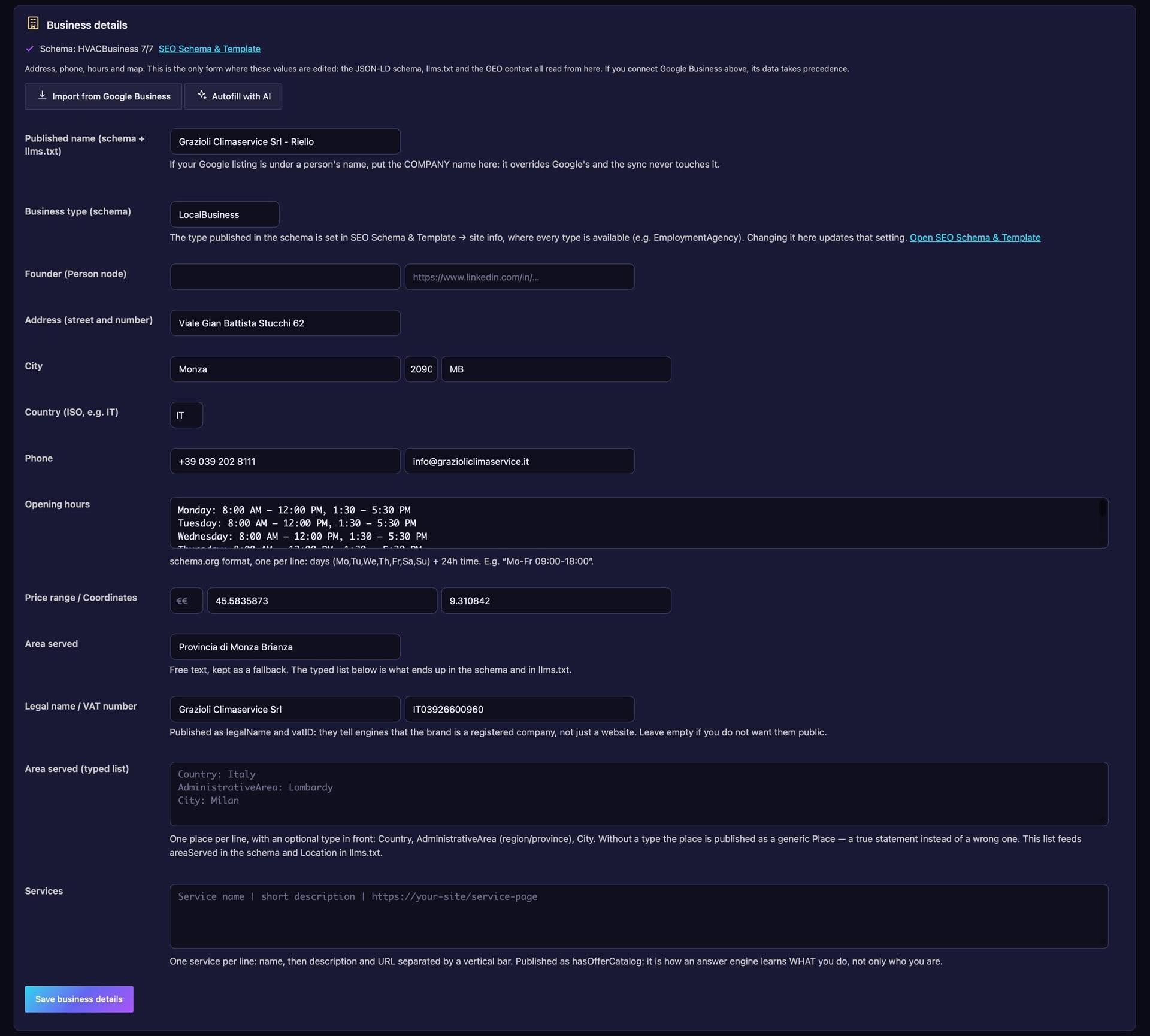
Describe your business once: legal name, VAT number, address, contact points, areas served as real places, services — or let Autofill with AI read your contact page and footer and propose the values, saving nothing until you confirm. With an SEO plugin active, AISA completes its Organization and WebSite nodes with these details instead of adding a second schema.
Auto SEO Content Fix
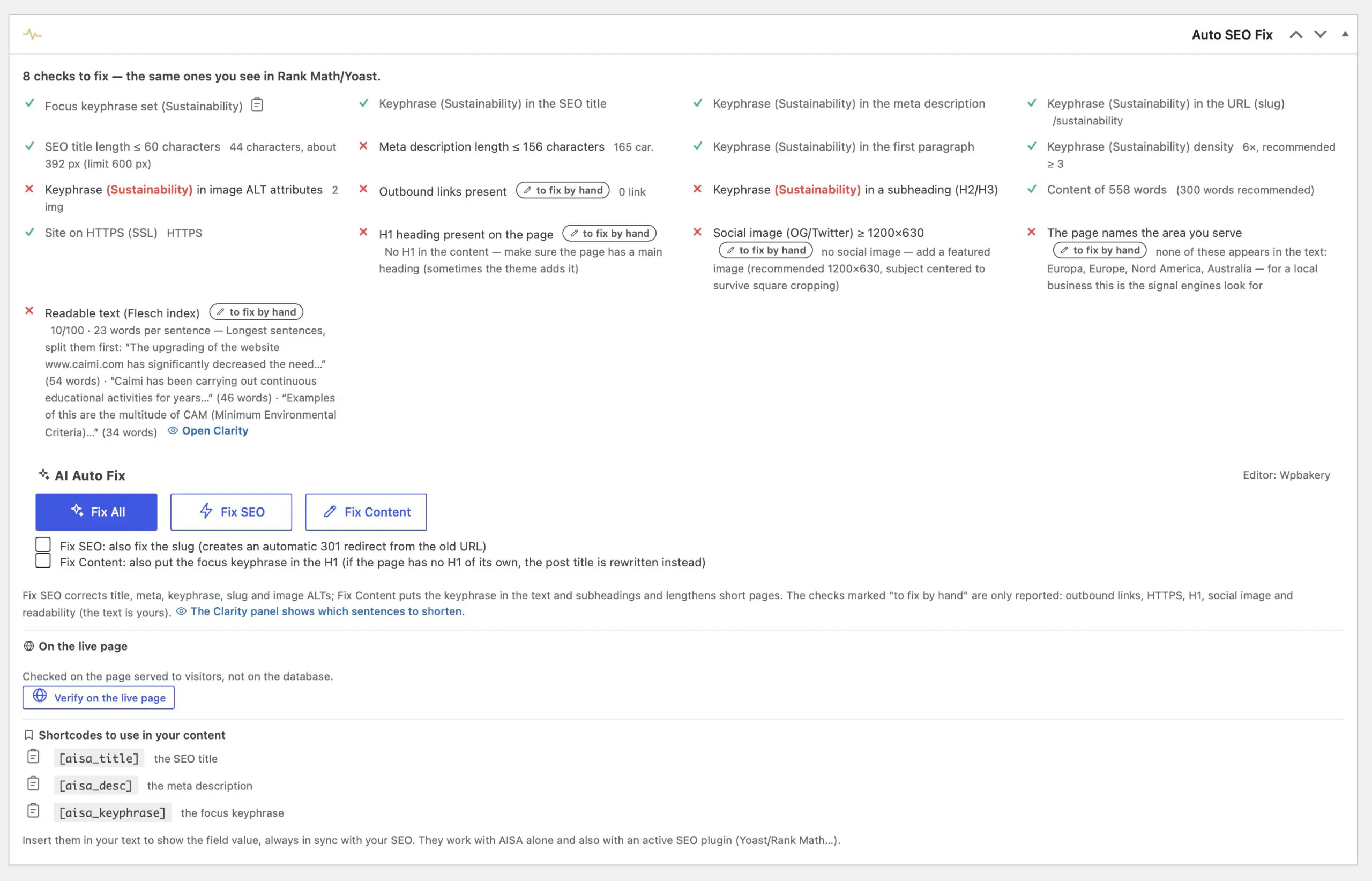
On-page audit plus AI correction of meta and content, across all editors (Classic, Gutenberg, WPBakery, Elementor; Divi coming soon).
Clarity: readability that fits the language and the reader
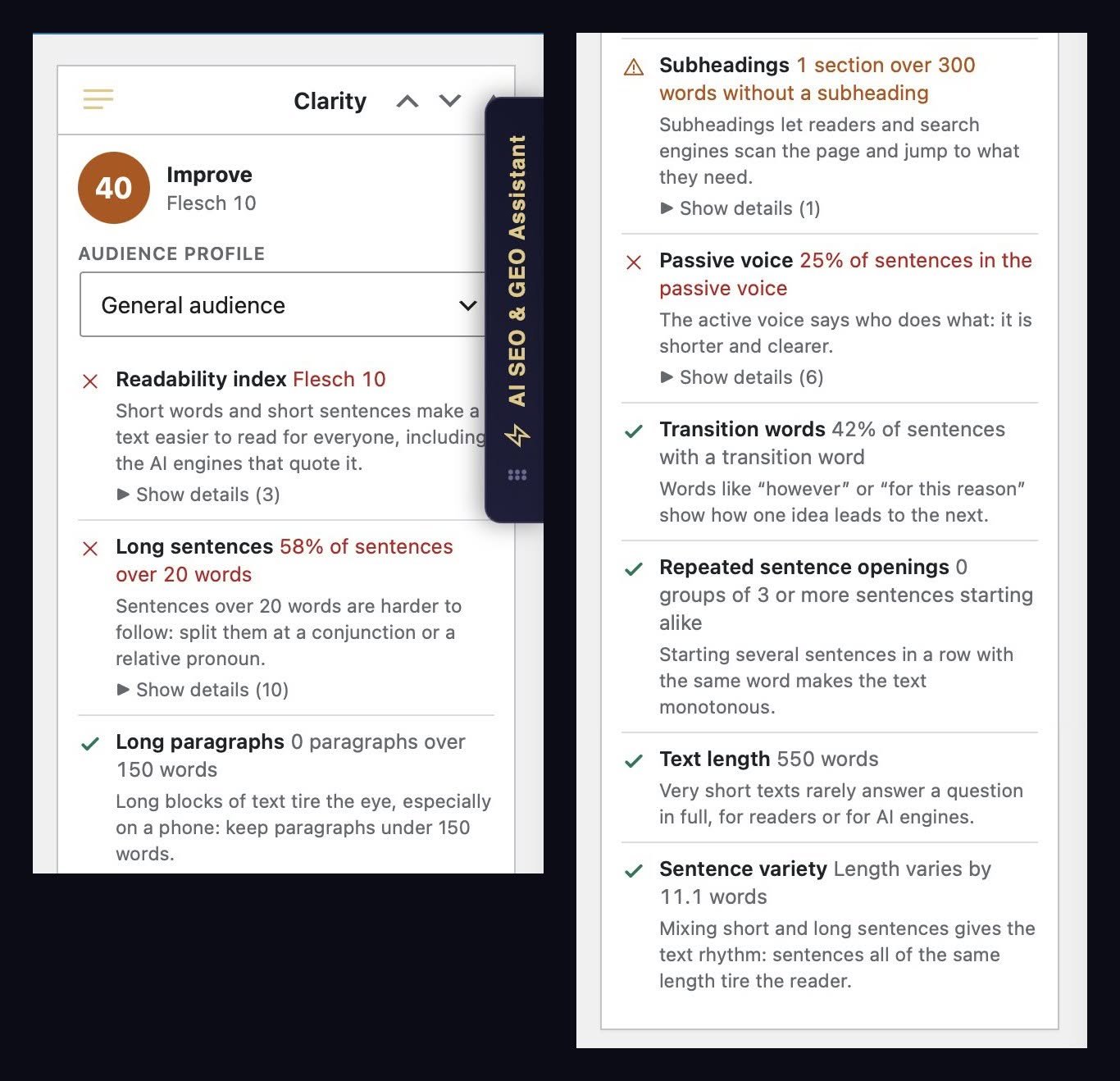
New in 2.0.2. While you write, the Clarity panel gives the text a score from 0 to 100 with a traffic light and nine checks: long sentences and paragraphs, subheadings, passive voice, transition words, repeated openings, length and sentence variety. The readability index follows the language — Gulpease for Italian, the index built for Italian, Flesch for English — and the pass marks follow your readers, with five audience profiles from public administration to specialist. In Gutenberg, the Classic editor and Elementor; the analysis runs in your browser, free, with a sortable Readability column in the content lists. With Premium, Split long sentences breaks up the longest ones without rewriting them.
Internal links from the text of the page
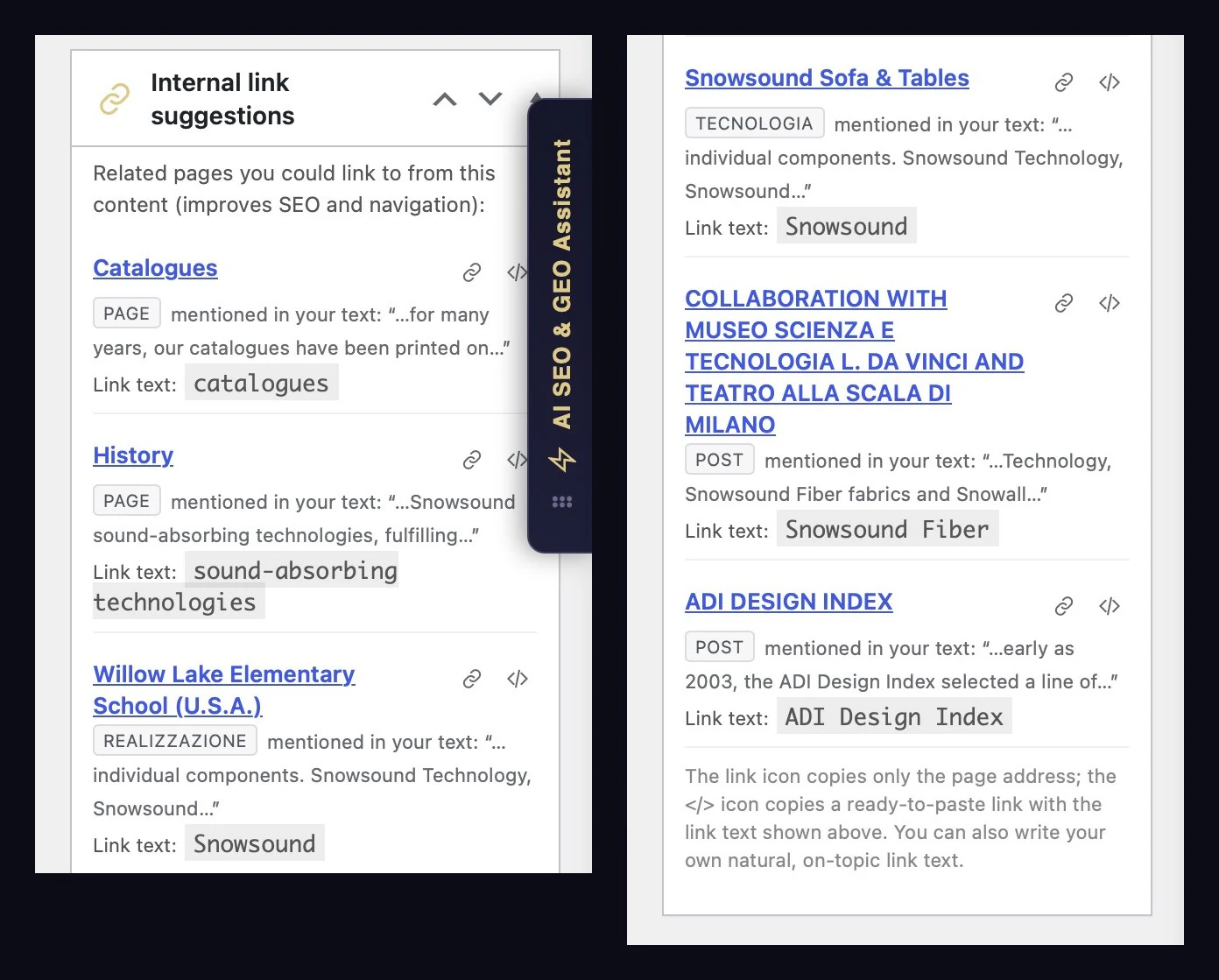
The Internal link suggestions box reads what you wrote: pages and posts your text already mentions come first, each with its reason — mentioned in your text, same category or tag, related topic — and the anchor as written in the page. Links already on the page, Elementor included, are not proposed again. Free, no AI, no credits.
Check Links & smart redirects
AISA scans your published content and finds broken links — internal and external. Changed slugs are repaired in one click (with an optional 301 redirect), broken external links can be re-pointed or unlinked, and sites that block bots are flagged for manual review — never fixed blindly. Every repair creates an undoable revision. Together with the Redirect & 404 log, lost traffic finds its way home.
Describe with AISA Vision (alt text + Undo)
AI-written alt text and image titles from a model that actually looks at the picture: describe a single image right from its alt field, a whole selection in the Media Library, or every image via Bulk and One-Click. Product photos weave the product name naturally into the description, WPML/Polylang media are described in their own language, machine names like IMG_1234 are ignored — and every run comes with one-click Undo, single image or whole batch. No other SEO plugin has that.
Turn on Describe new images on upload and every image you add — file picker, drag and drop, block editor — gets its alt text a few seconds later, in the language of your site, without you opening it. Off by default: nothing is spent until you switch it on.
Watch it live: 3 images described — and undone — in 20 seconds.
SEO Doctor (site-wide analysis + Find & Replace)
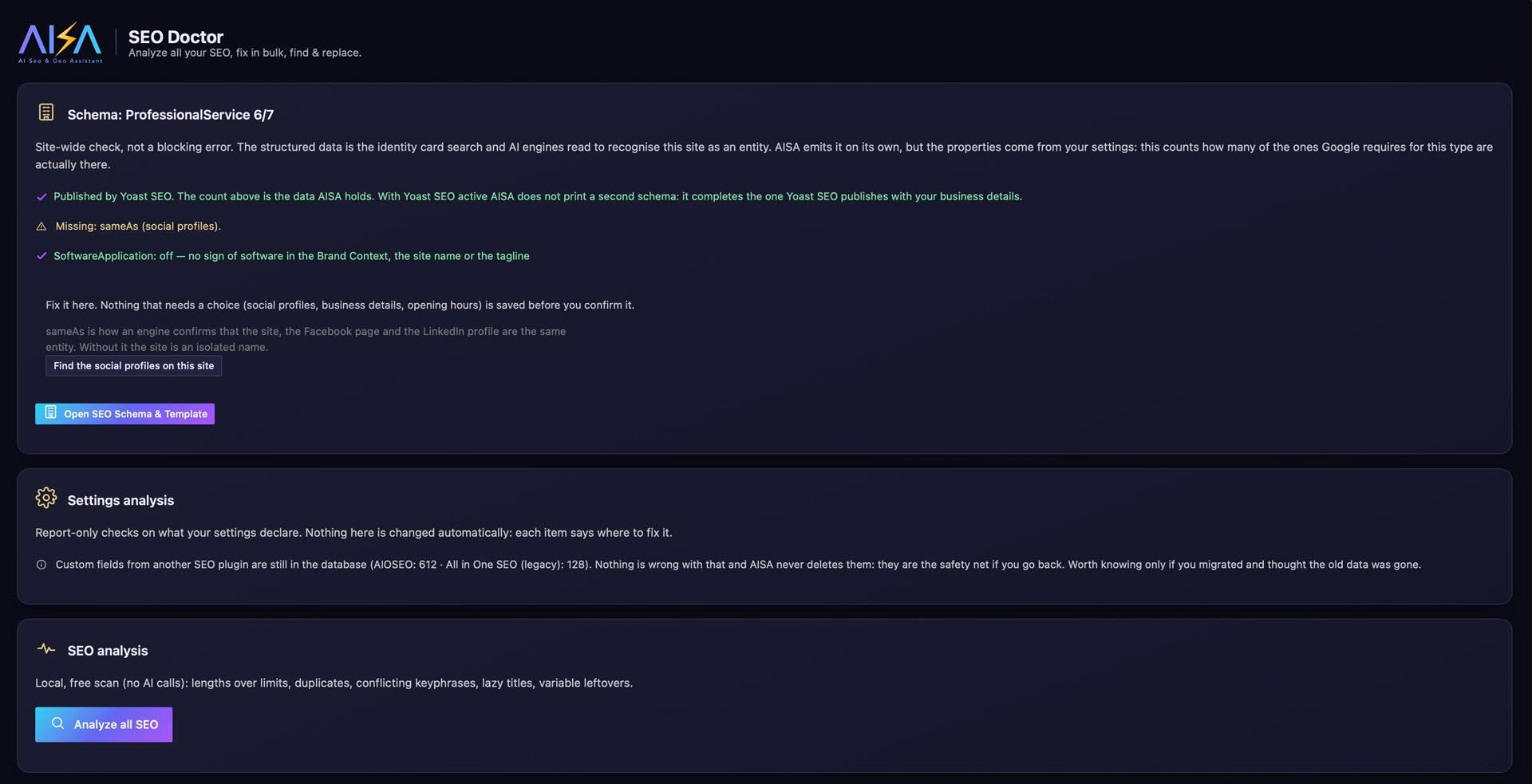
One page that checks all the SEO you have already published — free and with zero AI calls: missing fields, titles and meta descriptions over the limits, real duplicates, conflicting keyphrases (cannibalization), lazy titles, variable leftovers, images without ALT, plus robots.txt and llms.txt with a green check when they are in order. On the same page: Check Links for broken internal and external links, the crawl reports from Bing Webmaster, the CSV import from Search Console, PageSpeed and Safe Browsing.
Then it heals, group by group: Regenerate with AI a whole group (open the list, tick the rows you want — Shift-click selects a range — and read the before → after), clean the variable leftovers for free, or run a surgical Find & Replace on SEO title, meta description and focus keyphrase, with dynamic pills, a mandatory preview and undo of the last replacement. The Doctor repairs the SEO fields: rewriting the text of a page is the job of Auto SEO Content Fix. The check-up is free for everyone; applying the fixes in bulk is Premium.
From a real test: 2,942 items scanned, 11 titles with saved junk found and cleaned in one click.
SEO Consultant — do the AI engines cite you?
Classic SEO tools tell you where you rank on Google. The Consultant answers the question they ignore: when someone asks an AI engine about your industry, are you cited — and if not, who is cited in your place?
Three steps. Target searches: you write in plain language how you want to be found, or let the AI propose them from your Brand Context; each one becomes 2-3 real questions, the ones a customer would actually ask. The scan: AISA puts those questions to a real AI engine — Perplexity Sonar, OpenAI or Gemini, with your own key — and reads the answers: cited or not, in which position, and which competitors show up instead of you. You get an AI Visibility score and a question-by-question table. The recommendation (Premium): for every question where you are missing, it proposes the article to write — title, answer-first opening, an outline of question-shaped H2s, keyphrase, categories and tags picked among those that already exist on your site, internal links taken from your real content — and, if you want, it writes the draft in your own voice, in every language of the site.
One draft at a time, on purpose: the Consultant tells you what is worth writing, it does not fill your site with pages.
Brand Context & Writing DNA: the AI writes as your brand
Without context an AI writes correct text that could belong to anyone. A seafood restaurant in Milan gets “Seafood restaurant Milan | Full menu”, a title any restaurant in town could use. Tell AISA who you are and the same page gets “Seafood cooking since 1985 | Overlooking the Naviglio, Milan”.
Brand Context is where you describe your business once, in Settings → Brand Context & Style. Sector and business description are required. The rest is optional: target audience, tone of voice (professional, friendly, sophisticated, direct or technical), USP, mission, vision, values, brand story, geographic market, main language, keywords to include and terms to avoid. Two fields protect you from AI mistakes. Words not to translate keeps product and brand names identical in every language, and can add your WooCommerce product names for you. Practical info holds real facts such as parking, public transport and accessibility, and the FAQ and llms.txt use them as written instead of inventing them. You don’t start from a blank page: Generate all with AI recognises your type of business and pre-fills every field, each field has a Variants button, and with Google Business Profile connected, address, hours and reviews come straight from Google.
Writing DNA covers the other half. Brand Context says what you are; Writing DNA teaches the AI how you write: tone, rhythm, vocabulary, the way you open and close. Press Learn from the site to analyse your best content, or paste two or three texts you like. You get a plain-text profile you can edit line by line.
Both go into every generation: titles and meta descriptions, One-Click SEO and Bulk, Auto SEO Content Fix, Q&A sets, llms.txt, the description of your business in the schema, and the target searches and drafts of the SEO Consultant. You write your positioning once and the whole site speaks with one voice. Over MCP, an AI assistant can read your Brand Context with the free plugin and fill it in with Premium.
Bulk SEO & GEO
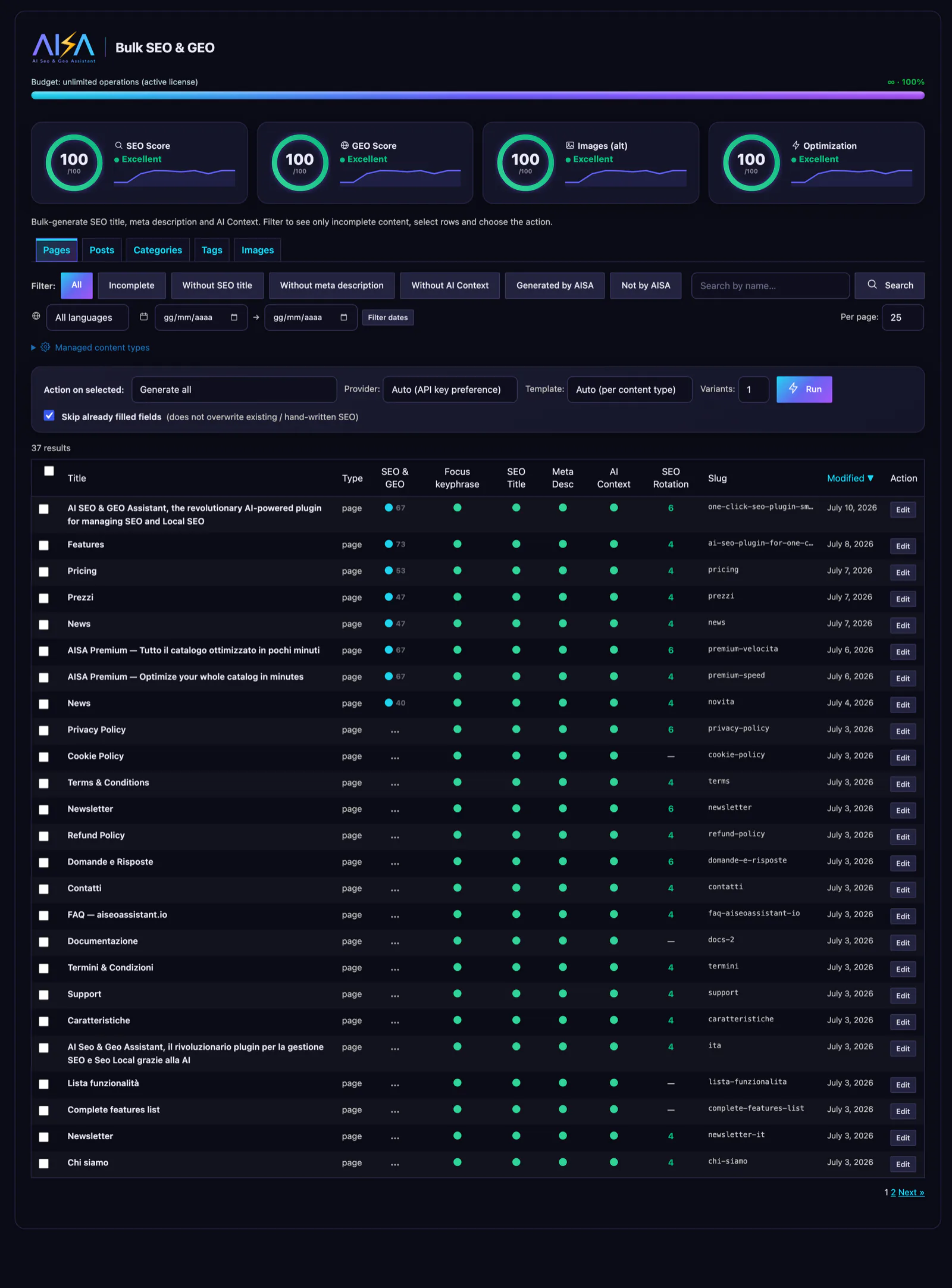
Optimize SEO and GEO in bulk across your whole site — pages, posts, WooCommerce products, categories, tags and images — in a single run, or automatically in the background.
Your keys or our Cloud
Use your own AI API keys, or our Cloud credits with zero setup. In Cloud 1 credit = 1 short request (a page, a product, an image); the long generations — Q&A sets, content rewrites, llms.txt, Consultant articles — cost 5 credits (the first Q&A set of a site costs 1), and the cost is always shown before you click. Credit costs per request type may change over time; credits already in your balance are never reduced.
SEO Template
Build reusable SEO title/description templates with a visual block builder and labeled variables (%%sitename%%, separator, page title…) — applied automatically per content type in Bulk and One-Click.
Usage & tokens
See exactly what the AI is doing: tokens (or Cloud credits) used per operation, history and estimated cost — full transparency, no surprises.
Utility — everything you need to move, back up and repair your SEO
One page for the day the SEO has to move. SEO data transfer / sync moves titles, meta descriptions and focus keyphrases between AISA and Yoast, Rank Math, SEOPress or AIOSEO, in either direction, contents and terms included: a status line tells you whether there is anything to do at all — how many values are missing at the destination, how many differ on the two sides, how many already match — the preview always comes first, and an SEO backup is taken automatically before anything is written.
SEO data backup / restore takes a full snapshot and puts it back exactly as it was, from the list or from a .json file. Settings import / export carries your configuration and your Q&A sets to another site. Automation (Premium) regenerates on a schedule. And for the day something looks wrong: Fix SEO database, Repair invisible SEO (Yoast), the LIVE SEO preview on the frontend, database cleanup, error log and optimization history.
What matters when you change SEO plugin: nothing is lost, and nothing leaves your site.